

Your internal processes stay the same - independent of the used survey platform.
Works with over 20 survey formats.
Such as SPSS, Confirmit, Kinesis and much more.
Your internal processes stay the same - independent of the used survey platform.

Smart Translate


SmartTranslate is a complete and powerful Survey Translation Management Platform which supports all major survey systems. It reduces translation costs with its internal translation memory, improves quality with its automatic technical checks and enables customer interaction with its preview module.
Forget manual overlays, copy&paste and working with unflexible ways to convert your translators output to the used survey system. SmartTranslate works directly with survey files and optimizes the whole workflow. It understands survey formats and knows what needs to be translated and which internal fields do not require translation.
We do not translate.
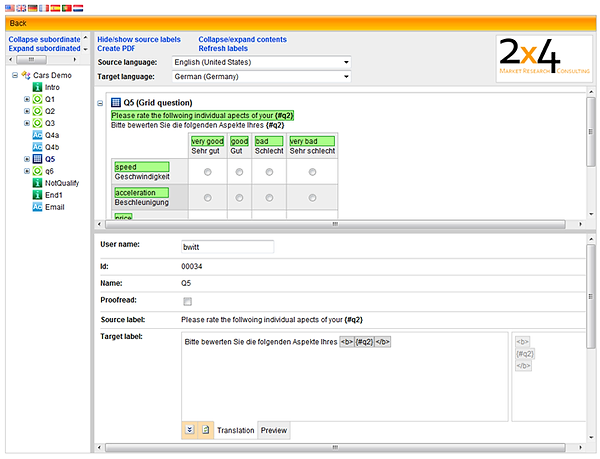
SmartTranslate clearly displays the translation process and eases communication between translators and customers.
We simplify the process.


7 unique key facts
Manages the whole survey translation process
Reduce translation cost & increase quality
with the build-in translation database and integrated checks for HTML tags, insert/pipe ins and much more.
Managing survey translation can be a very time consuming task for market research companies.
There are basically 3 different ways of handling survey translations in general. These ways are mainly independent of the used survey systems:

Using C. SmartTranslate, the translation process starts a bit later as with option A but due to the change management features, translation can start earlier as option B.
The main time safer can be seen at the end of the process, as there is no time consuming copy and paste needed any more. In all cases of needed changes, SmartTranslate is showing its real power.
While we can see that timing is optimized the overall quality goes up, while costs are going down - mainly at the part of translation integration, quality check and change management.
Timings & cost are shifted with the several ways.
The 2x4 SmartTranslate® Process
Almost all Survey Systems offer a simple way of inserting translation to a survey.
They work in an online environment or allow to export the current status quo of a survey while SmartTranslate implements a powerful process for managing survey translations. The process is based on the fact that survey translation always include different versions and changes from different angles like scriptwriters, clients or reviewers will happen.
The SmartTranslate process is also based on the fact that professional translators will not use any online web based or survey tool for their initial translations and that they will usually prefer excel or word with trados plugins or other special translation software.After translation is done, proof checking takes place to identify all technical problems around html tags, placeholders, misused brand names and more. The integrated brand database contains about 10.000 different brands and allows identifying misspelled brand names in the translated labels.
Last but not least, we know that in all processes with change management implemented it is absolutely necessary to document every single change. SmartTranslate is doing this in the background and tracks all information in the most detailed way. These information can be downloaded for further storage ore investigation.
Change management with SmartTranslate
Whenever there are changes in the original Survey Files, SmartTranslate will pick them up and identify the needed actions. Translators and Project Managers are notified immediately about needed next steps and SmartTranslate coordinates the whole synchronisation tasks.
This keeps the process flexible and survey authors can make changes even if translators are already working on the files. There is no blackout period needed anymore.The SmartTranslate Preview module allows end clients and reviewers to check all available translations without the need of follow any routings. Any two languages can be reviewed together, e.g. source and target languages. Change requests from reviewer or clients can be entered directly into the web based review module which starts a change management process with automated notifications. Multiple users can work with the same projects at the same time - whenever one change request or comment is entered, all other users see the immediate effect.
Click below to see more informations.
The translator receives a word document and delivers back a word document. Problems are that the translators actually translate everything they find, like internal project description, routing and sample instruction and parts which are valid for one country only. 2nd problem is that the MR company is left alone with the problem of quality checks and copy & paste the translations into the survey systems.
The scriptwriter needs to finish scripting and has a black out period while the translators are doing their work. there are no instructions which the translator would accidentially translate but there are many internal fields which need to be identified. once the file is delivered back from the translator, changes can be made.
The smart translate way is the optimized way of handlingnsurvey translations.
There is no blackout period needed for the translator and it ofers a wide range of identifying internal parts which are not needed for translations. It offers also productivity tools like the integrated translation database, quality tools like brandchecks and HTML checking, and it handles all changes from the survey author as well as from the reviewer/client. To get the best out of it it is important to ask clients for their input of recognizing non translatable text.


The traditional way (use paper questionnaire only)
Working manually with survey files
The SmartTranslate way
-
Upload from SPSS / Confirmit / Nebu / Other...
-
Checking for existing translations
-
Export to Translator as MS Word / Excel / CSV
-
Import from Translator as MS Word / Exel / CSV
-
Quality checks for brands, HTML tags, placeholders, s.o.
-
Comparing source and target language, suggestions for change requests
-
Download for SPSS / Confirmit / Nebu / Other...

Upload
Translation
DB
Export to translator
Import from translator
Quality checks
Preview for proof-
reading
Download
